The question “which codec should I use for a latency-sensitive Jetson pipeline?” does not have a single obvious answer on paper. H.264 is the oldest standard with the longest hardware support history. H.265 offers better compression. AV1 is the newest and is a JetPack 6 addition. Published latency comparisons for Jetson’s NVMM (nvv4l2) codec stack are sparse, and the ones that exist rarely separate encode, wire, and decode into distinct measured stages.
This post is the benchmark I wanted to find but couldn’t.
The setup: two Jetson Orin boards on a GbE LAN. videotestsrc → hardware encoder → TCP → hardware decoder. GStreamer pad probes record wall-clock timestamps at four points in the pipeline. Chrony synchronizes the two Jetson clocks to within ±234 µs. 900 frames per combination, 30-frame warmup discarded. Six combinations total: [H.264, H.265, AV1] × [FHD 1920×1080, HD 1280×720].
TL;DR: AV1 wins end-to-end at every resolution. H.264 is not second — it is last by a large margin, because the nvv4l2decoder holds ~4 frames in an internal decoded picture buffer before releasing output, adding 130–170 ms of hidden latency that does not appear in any encoder specification.
Hardware and test conditions
| Item | Detail |
|---|---|
| Hardware | NVIDIA Jetson Orin (both sender and receiver) |
| OS | JetPack 6 / L4T R36.4.x |
| Network | GbE LAN, TCP (tcpserversink / tcpclientsrc) |
| Bitrate | 1500 kbps (fixed, same for both resolutions) |
| Frame rate | 30 fps |
| Source | videotestsrc pattern=ball is-live=true |
| Measurement frames | 900 per combination (30-frame warmup discarded) |
| Resolutions | FHD 1920×1080, HD 1280×720 |
| Codecs | H.264 (nvv4l2h264enc), H.265 (nvv4l2h265enc), AV1 (nvv4l2av1enc) |
| Sender IP | 192.168.1.10 |
| Receiver IP | 192.168.1.20 |
All codecs are hardware-accelerated via NVIDIA’s V4L2 (nvv4l2) interface. Both systems run inside the same Docker image built from ubuntu:22.04 with GStreamer 1.22 installed.
Pipeline architecture
Sender (H.264 example)
videotestsrc pattern=ball num-buffers=930 is-live=true
  ! video/x-raw,format=I420,width=1920,height=1080,framerate=30/1
  ! nvvidconv
  ! video/x-raw(memory:NVMM),format=NV12
  ! nvv4l2h264enc name=encoder bitrate=1500000
      insert-sps-pps=true iframeinterval=30 num-B-Frames=0
  ! h264parse
  ! identity name=tx_probe sync=false
  ! tcpserversink name=sink host=0.0.0.0 port=5100 sync=false
      recover-policy=none buffers-soft-max=300
The encode path:
videotestsrcproduces raw I420 frames at exactly 30 fps (is-live=trueis mandatory — without it the encoder runs at unbounded speed, fills the TCP sink buffer in ~1.5 seconds, and the receiver gets a mid-stream join without parameter sets).nvvidconvconverts to NVMM-backed NV12 so the encoder can do a DMA transfer directly from GPU memory.nvv4l2h264encdoes hardware encoding.insert-sps-pps=true iframeinterval=30embeds parameter sets at every IDR frame so the receiver can sync even on a mid-stream join.num-B-Frames=0disables B-frame reordering — a necessary condition for meaningful latency measurement, since B-frames introduce intentional encoder delay.h264parsere-frames the bytestream into Access Units.- The
tx_probeidentity element is where the sender timestamps the buffer just before it enters the TCP sink.
Receiver (H.264 example)
tcpclientsrc name=src host=192.168.1.10 port=5100
  ! h264parse
  ! identity name=dec_in_probe sync=false
  ! nvv4l2decoder name=decoder
  ! nvvidconv
  ! video/x-raw,format=I420
  ! identity name=dec_out_probe sync=false
  ! fakesink sync=false
The decode path:
tcpclientsrcreceives the TCP bytestream.h264parsere-frames it into Access Units and passes them to the decoder. Notably, there is nocapsproperty ontcpclientsrc— trying to set caps directly on it produces agst_parse_error. The parse element after the source handles format negotiation.dec_in_probetimestamps the buffer entering the decoder.nvv4l2decoderdoes hardware decoding.dec_out_probetimestamps the buffer exiting the decoder.fakesinkdiscards frames (we are measuring latency, not displaying).
AV1 differences
AV1 uses nvv4l2av1enc with iframeinterval=30 insert-seq-hdr=true. The insert-seq-hdr=true flag is the AV1 equivalent of insert-sps-pps=true: it embeds the Sequence Header OBU at every IDR frame. Without it, av1parse on the receiver outputs zero frames after a mid-stream join because it cannot determine video dimensions from inter frames alone.
The receiver uses a bare av1parse with no explicit capsfilter — the Sequence Header OBU carries enough information for the parser to negotiate dimensions automatically.
Sender synchronization: PAUSED + client-added
A subtle but important design choice: the sender pipeline starts in PAUSED state. tcpserversink binds its port in PAUSED, so the receiver can connect before encoding begins. When the receiver’s tcpclientsrc connects, tcpserversink fires a client-added signal. The sender’s Python code responds with GLib.idle_add(pipeline.set_state, Gst.State.PLAYING), which transitions the pipeline and starts encoding with zero buffer queue depth.
Without this, the sender would be encoding at 30 fps while the receiver is still starting up. The TCP sink would buffer 8+ seconds of encoded frames, and the receiver would measure wire latency that includes the time those frames spent queued in memory — inflating wire measurements by ~8600 ms (an outlier we observed during early testing without this fix).
Timing methodology
Four timestamps, three latency stages:
SENDER (192.168.1.10)                      RECEIVER (192.168.1.20)
──────────────────────────────             ─────────────────────────────────
videotestsrc (is-live=true)
  │
  ▼ enc_in_ns  ← probe on encoder sink
nvv4l2h264enc / nvv4l2h265enc
  / nvv4l2av1enc
  │
  ▼ enc_out_ns ← probe on encoder src
[h264parse / h265parse]          TCP
  │                           ──────►  tcpclientsrc
  ▼ tx_ns      ← probe on                │
    tx_probe identity                    ▼ [h264parse / h265parse / av1parse]
tcpserversink                            │
                                         ▼ dec_in_ns ← probe on dec_in_probe
                                         │
                                         ▼ nvv4l2decoder
                                         │
                                         ▼ dec_out_ns ← probe on dec_out_probe
                                         │
                                         ▼ fakesink
| Stage | Formula | Clock scope |
|---|---|---|
| Encode | enc_out_ns − enc_in_ns | Sender only, no clock sync needed |
| Wire | dec_in_ns − tx_ns | Cross-host — requires synchronized clocks |
| Decode | dec_out_ns − dec_in_ns | Receiver only, no clock sync needed |
| E2E | Encode + Wire + Decode | Full pipeline: encoder input → decoder output |
All timestamps are taken with Python’s time.time_ns() inside GStreamer pad probe callbacks. Because probes fire synchronously on the streaming thread, there is no additional scheduling jitter beyond what the OS introduces.
Metadata insertion and frame identity
Sender side — PTS as frame index.
videotestsrc sets each buffer’s PTS to frame_idx × (GST_SECOND / FPS). With num-B-Frames=0 the nvv4l2 encoders preserve PTS unchanged through the encode stage. The sender probe callbacks recover the frame index as pts / FRAME_DURATION_NS and store it as the CSV key.
PTS is not transmitted across TCP.
tcpserversink sends a raw bytestream — GStreamer buffer metadata (PTS, DTS, duration flags) lives in the GstBuffer struct and is never serialised onto the wire. tcpclientsrc on the receiver delivers a bare bytestream with no timing metadata attached.
Receiver side — sequential counter.
After a parse element each output buffer is exactly one access unit (one frame). The receiver uses a monotonically incrementing counter for frame_idx. This is safe because:
parse → nvv4l2decoderis a 1:1 FIFO withnum-B-Frames=0(no reordering)- TCP is lossless and in-order on a LAN
The sender and receiver counters align because both start at zero and neither pipeline drops frames.
In-band bitstream metadata.
insert-sps-pps=true (H.264/H.265) and insert-seq-hdr=true (AV1) embed codec parameter sets into the bitstream at every IDR frame. This is bitstream-level metadata — not GStreamer buffer metadata — and is transmitted. It allows the receiver’s parse element to determine video dimensions and framerate from any IDR boundary, enabling mid-stream joins without prior signalling.
Clock synchronization
Wire latency is the only stage that requires clock synchronization between the two machines. Encode and decode are measured entirely within a single host, so no cross-machine timing is needed for those stages. But wire = dec_in_ns − tx_ns subtracts a receiver timestamp from a sender timestamp — those two clocks must agree.
The achieved offset on this run: +202 µs ± 234 µs. At 30 fps (one frame = 33.3 ms), that is 0.7% of a frame period — well within the acceptable range for latency measurements in the 67–100 ms range.
How to sync two Linux machines with NTP using chrony
This section is a self-contained how-to for anyone who needs sub-millisecond clock agreement between two Linux hosts on the same LAN — not only for this benchmark, but for any cross-host timestamp comparison.
Why NTP, and why chrony specifically
The Network Time Protocol (NTP) synchronizes clocks by measuring the round-trip time to a reference server, estimating one-way propagation, and applying a correction to the local clock. On a LAN with sub-millisecond RTT, NTP routinely achieves ±100–500 µs accuracy.
chrony is the recommended NTP implementation on modern Linux. It converges faster than the classic ntpd (especially after cold starts or when the initial clock error is large), handles intermittent network connections better, and exposes better diagnostics via chronyc. It ships by default on Ubuntu 20.04+ and most Jetson JetPack images.
NTP stratum levels
NTP uses a stratum hierarchy to describe clock quality:
| Stratum | Source |
|---|---|
| 0 | Physical reference (GPS, atomic clock) — not an NTP node |
| 1 | Host directly connected to stratum-0 hardware |
| 2 | Host syncing from a stratum-1 server |
| 3–15 | Each hop adds one stratum |
| 16 | Unsynchronized (special value meaning “not a valid source”) |
On an air-gapped LAN with no GPS or internet, neither machine has a real stratum-0 source. The solution is orphan mode: chrony allows a host to declare itself stratum-1 autonomously, using its own free-running local oscillator as the reference. The receiver then treats the sender as a legitimate stratum-1 source and syncs to it. Both machines agree with each other, even though neither is tied to an absolute time standard. For a latency benchmark this is exactly what we need: relative agreement between the two clocks, not absolute UTC accuracy.
Step-by-step: configure sender as NTP server
1. Install chrony on both hosts (if not already present)
sudo apt-get install -y chrony
2. Configure the sender as a stratum-1 orphan NTP server
Write the following to /etc/chrony/chrony.conf on the sender:
# Sender acts as NTP server for the benchmark LAN.
# 'orphan' lets it free-run as stratum 1 without an upstream reference.
local stratum 1 orphan
allow 192.168.1.0/24
driftfile /var/lib/chrony/drift
makestep 1.0 3
rtcsync
Key directives:
local stratum 1 orphan— declares this machine as a stratum-1 reference;orphanprevents it from advertising itself as a time source unless it is actually in sync with itself (prevents loops in larger setups).allow 192.168.1.0/24— permits NTP queries from any host on the subnet. Substitute your actual subnet.driftfile— persists the measured oscillator drift rate across reboots so chrony does not have to re-learn it each time.makestep 1.0 3— allows a step correction (rather than a slow slew) for the first 3 clock updates if the offset exceeds 1 second. This speeds up initial convergence.rtcsync— keeps the hardware RTC in sync with the system clock.
Restart chrony to apply:
sudo systemctl restart chrony
Wait approximately 60 seconds for chrony to stabilize its stratum-1 declaration. During this window the sender is still converging its own internal clock model; the receiver should not start syncing until the sender is stable.
3. Configure the receiver to sync from the sender
Write the following to /etc/chrony/chrony.conf on the receiver, substituting the sender’s IP:
# Sync exclusively from the sender Jetson
server <sender-ip> iburst prefer
driftfile /var/lib/chrony/drift
makestep 1.0 3
rtcsync
Key directives:
server <sender-ip> iburst prefer— sets the sender as the only NTP source.iburstsends a burst of 8 packets on startup instead of 1, reaching initial sync 4–8× faster.prefermarks this source as preferred when multiple sources are configured.
Restart chrony:
sudo systemctl restart chrony
Step-by-step: verify sync quality
Run on the receiver after ~60 seconds:
chronyc tracking
Example output:
Reference ID    : C0A80101 (192.168.1.10)
Stratum         : 2
Ref time (UTC)  : Mon May 12 09:14:33 2026
System time     : 0.000202 seconds fast of NTP time
Last offset     : +0.000198 seconds
RMS offset      : 0.000221 seconds
Frequency       : 3.271 ppm fast
Residual freq   : +0.002 ppm
Skew            : 0.083 ppm
Root delay      : 0.000412 seconds
Root dispersion : 0.000104 seconds
Update interval : 8.0 seconds
Leap status     : Normal
What to look at:
| Field | What it means | Target |
|---|---|---|
Reference ID | The NTP server being used — should show sender’s IP | sender’s IP |
Stratum | Should be 2 (one hop from sender’s stratum 1) | 2 |
System time | Current offset from NTP time | < 1 ms |
Last offset | Offset at the last update | < 1 ms |
RMS offset | Root-mean-square of recent offsets — the stability measure | < 500 µs |
Root delay | Round-trip time to reference — should be sub-ms on LAN | < 1 ms |
Root dispersion | Accumulated error estimate | < 1 ms |
For this benchmark run: System time = +202 µs, RMS offset = 221 µs. Both are well under the 1 ms target.
Also check the source list:
chronyc sources -v
Example output:
  .-- Source mode  '^' = server, '=' = peer, '#' = local clock.
 / .- Source state '*' = current best, '+' = combined, '-' = not used,
| / .- Distance: '*' = outlier rejected, '~' = stale, '?' = unknown
| | / .- Jitter: '/' = high
| | | /
S Name/IP Address        Reach LastRx Last sample
===============================================================================
^* 192.168.1.10               17     8   +202us[+198us] +/-  309us
The * next to the sender IP confirms it is the active reference. The [+198us] is the last measured offset; +/- 309us is the estimated uncertainty.
The full setup script
scripts/setup_timesync.sh automates both roles:
#!/usr/bin/env bash
# Usage:
#   On sender:   ./setup_timesync.sh sender
#   On receiver: ./setup_timesync.sh receiver <sender-ip>

set -euo pipefail

ROLE=${1:-sender}
SENDER_IP=${2:-<sender-ip>}

install_chrony() {
    if ! command -v chronyc &>/dev/null; then
        sudo apt-get install -y chrony
    fi
}

configure_sender() {
    sudo tee /etc/chrony/chrony.conf > /dev/null <<EOF
local stratum 1 orphan
allow 0.0.0.0/0
driftfile /var/lib/chrony/drift
makestep 1.0 3
rtcsync
EOF
    sudo systemctl restart chrony
}

configure_receiver() {
    sudo tee /etc/chrony/chrony.conf > /dev/null <<EOF
server ${SENDER_IP} iburst prefer
driftfile /var/lib/chrony/drift
makestep 1.0 3
rtcsync
EOF
    sudo systemctl restart chrony
    # Poll for convergence
    for i in $(seq 1 12); do
        sleep 5
        offset=$(chronyc tracking 2>/dev/null \
            | awk '/System time/ {gsub(/[^0-9.\-]/, "", $5); print $5}')
        echo "[timesync] offset: ${offset} s"
    done
}

install_chrony
case "$ROLE" in
    sender)   configure_sender ;;
    receiver) configure_receiver ;;
    *)        echo "Usage: $0 [sender|receiver] [sender_ip]"; exit 1 ;;
esac

echo "=== chronyc tracking ===" && chronyc tracking
echo "=== chronyc sources ===" && chronyc sources -v
Run sequence from your dev machine:
# Step 1 — configure sender as stratum-1 NTP server
ssh nvidia@<sender-ip> bash -s <<'ENDSSH'
sudo tee /etc/chrony/chrony.conf > /dev/null <<'EOF'
local stratum 1 orphan
allow 0.0.0.0/0
driftfile /var/lib/chrony/drift
makestep 1.0 3
rtcsync
EOF
sudo systemctl restart chrony
ENDSSH

# Step 2 — wait 60 s for sender to stabilize, then configure receiver
sleep 60
ssh nvidia@<receiver-ip> bash -s <<ENDSSH
sudo tee /etc/chrony/chrony.conf > /dev/null <<EOF
server <sender-ip> iburst prefer
driftfile /var/lib/chrony/drift
makestep 1.0 3
rtcsync
EOF
sudo systemctl restart chrony
ENDSSH

# Step 3 — verify on receiver (target: System time < 0.001 s)
ssh nvidia@<receiver-ip> "chronyc tracking"
Common failure modes
| Symptom | Cause | Fix |
|---|---|---|
Stratum: 16 on receiver | Sender not reachable or not yet stable | Wait 60 s and retry; check ufw/iptables allow UDP 123 |
Reference ID: 7F7F0101 (127.127.1.1) | Receiver fell back to local clock — sender unreachable | Verify sender IP in chrony.conf; check firewall |
| Offset > 10 ms after 2 min | Large initial error, makestep not triggered | Run sudo chronyc makestep manually to force immediate step |
Root delay > 5 ms | High LAN RTT or switch congestion | Verify hosts are on the same switch; avoid WiFi |
| Offset bounces ±1–2 ms | Kernel clock frequency instability (common on Jetson after warm boot) | Run sudo chronyc makestep then wait 2 min |
Why ±234 µs is sufficient here
The wire latency measurements in this benchmark are in the 67–100 ms range. A ±234 µs clock error represents:
- 0.35% of the 67 ms H.264/AV1 wire measurement
- 0.23% of the 100 ms H.265 wire measurement
For the benchmark’s purpose — comparing codecs, not computing absolute latency — this error is negligible. Even if the offset were a full millisecond, it would shift all wire measurements equally and not change any codec comparison.
For applications where absolute wire latency accuracy matters (e.g., measuring <5 ms video paths), consider PTP (IEEE 1588) with hardware timestamping support, which achieves sub-microsecond accuracy on compatible NICs.
Results
All values in milliseconds. Format: mean / p95.
Summary — E2E latency
| Codec | FHD E2E mean | HD E2E mean | vs H.264 FHD |
|---|---|---|---|
| AV1 | 104.0 ms | 85.8 ms | −122.9 ms |
| H.265 | 134.3 ms | 117.1 ms | −92.6 ms |
| H.264 | 226.9 ms | 245.8 ms | — |
AV1 beats H.265 by ~30 ms and H.264 by ~120–160 ms at both resolutions.
Per-stage breakdown — FHD 1920×1080
| Stage | H.264 | H.265 | AV1 |
|---|---|---|---|
| Encode mean | 16.4 ms | 15.5 ms | 17.4 ms |
| Encode p95 | 16.9 ms | 15.8 ms | 17.9 ms |
| Wire mean | 67.3 ms | 100.4 ms | 67.6 ms |
| Wire p95 | 68.1 ms | 101.4 ms | 68.6 ms |
| Decode mean | 143.2 ms | 18.5 ms | 19.0 ms |
| Decode p95 | 145.1 ms | 19.0 ms | 19.6 ms |
| E2E mean | 226.9 ms | 134.3 ms | 104.0 ms |
| E2E p95 | 228.7 ms | 135.2 ms | 104.9 ms |
Per-stage breakdown — HD 1280×720
| Stage | H.264 | H.265 | AV1 |
|---|---|---|---|
| Encode mean | 8.5 ms | 8.0 ms | 9.4 ms |
| Encode p95 | 8.9 ms | 8.4 ms | 9.8 ms |
| Wire mean | 67.3 ms | 100.4 ms | 67.5 ms |
| Wire p95 | 68.0 ms | 101.3 ms | 68.3 ms |
| Decode mean | 170.0 ms | 8.6 ms | 8.9 ms |
| Decode p95 | 172.5 ms | 9.0 ms | 9.3 ms |
| E2E mean | 245.8 ms | 117.1 ms | 85.8 ms |
| E2E p95 | 248.2 ms | 118.0 ms | 86.4 ms |
Full percentile data — notable outliers
| Codec | Res | Stage | mean | p50 | p95 | p99 | max |
|---|---|---|---|---|---|---|---|
| H.264 | FHD | Decode | 143.2 | 144.0 | 145.1 | 146.2 | 147.1 |
| H.264 | HD | Decode | 170.0 | 171.6 | 172.5 | 173.0 | 173.5 |
| H.265 | FHD | Encode | 15.5 | 15.1 | 15.8 | 23.3 ⚠ | 23.8 |
| H.265 | FHD | Wire | 100.4 | 100.6 | 101.4 | 109.1 ⚠ | 109.6 |
| AV1 | FHD | Wire | 67.6 | 67.6 | 68.6 | 70.2 | 84.1 ⚠ |
The ⚠ values spike significantly above p95. H.265 p99 encode spikes (23 ms vs 15 ms mean) correlate with IDR frame insertion. AV1 wire max outliers are isolated single-frame events, not systematic.
Visual breakdown
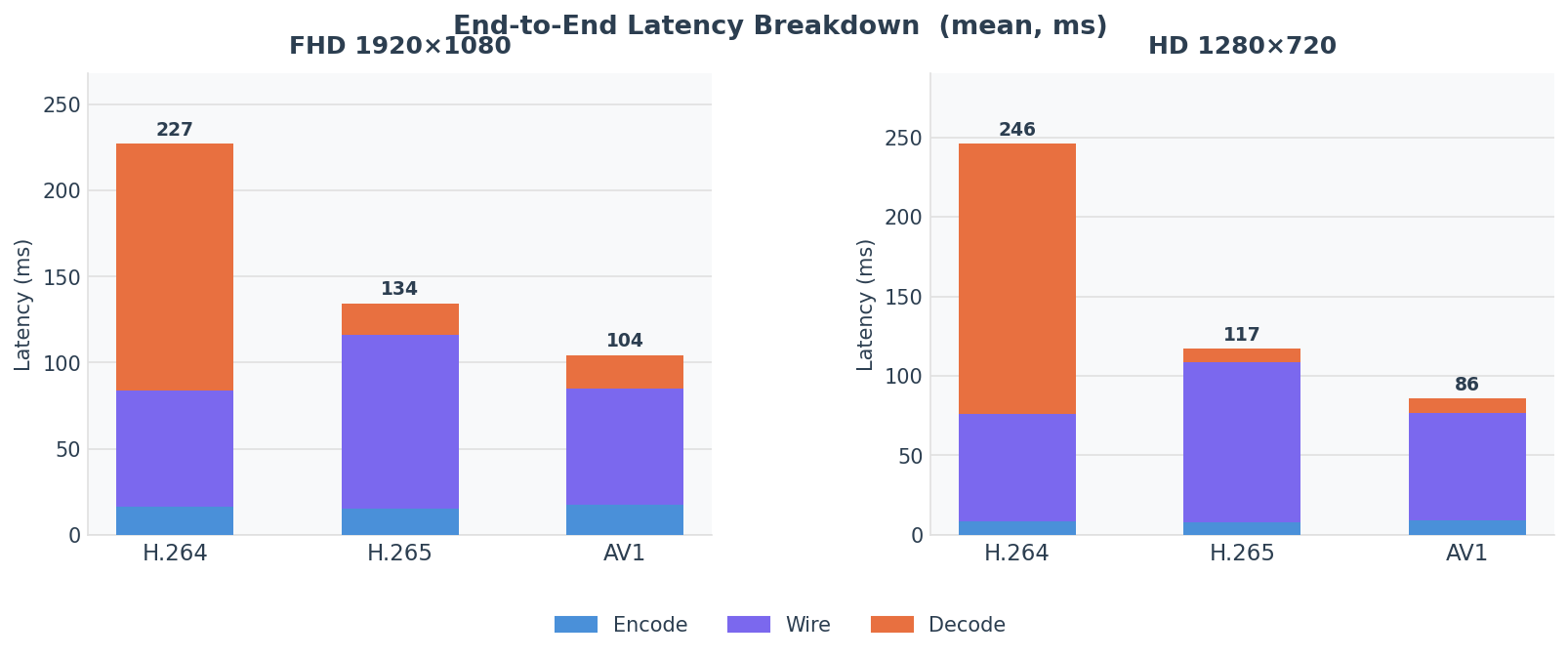
The stacked chart makes the H.264 decoder anomaly immediately visible: decode (red segment) consumes most of the H.264 bar while being negligible for H.265 and AV1.
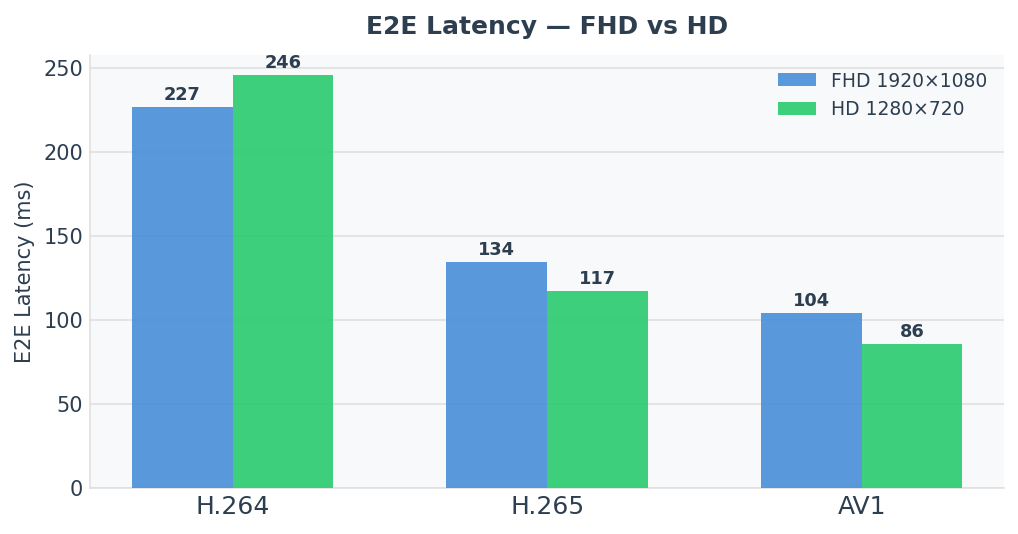
The grouped chart shows two unexpected patterns: H.264 E2E is worse at HD than FHD (245 ms vs 227 ms), and AV1 achieves the lowest E2E at both resolutions despite being the newest codec on the stack.
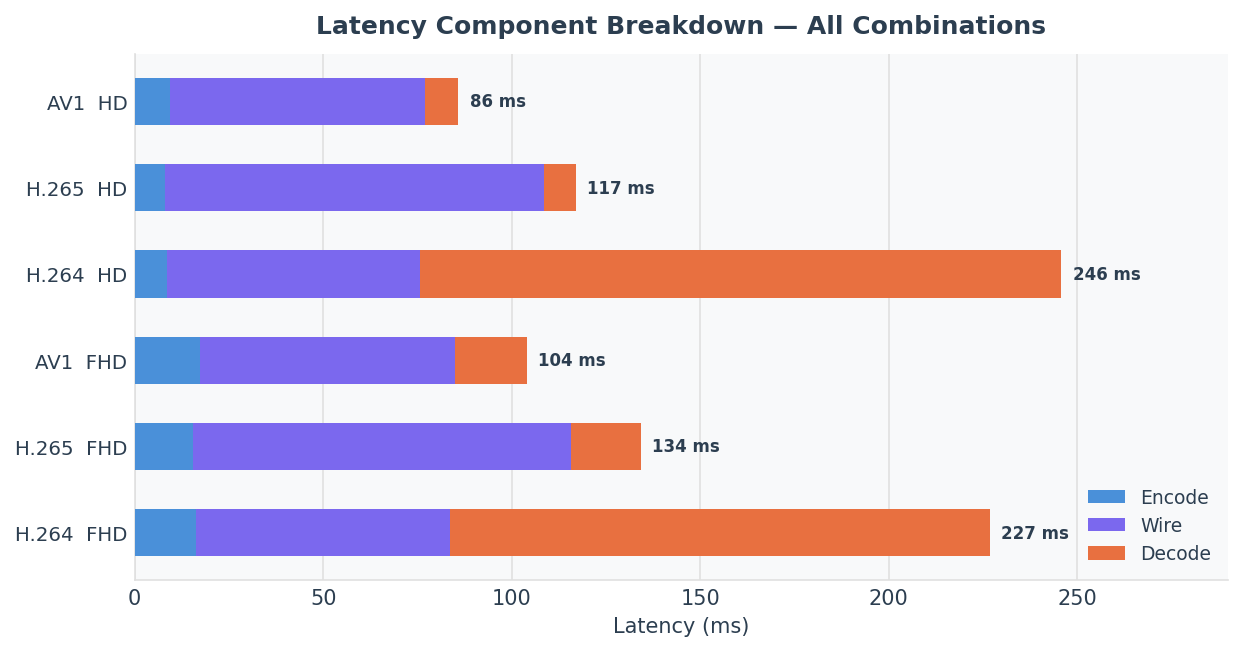
Key finding 1: H.264 decode anomaly
The most surprising result: H.264 decode latency is 143 ms at FHD and 170 ms at HD.
For reference, H.265 and AV1 decode in 8–19 ms at both resolutions. H.264 decode is 7–20× slower.
The cause is the Decoded Picture Buffer (DPB). The H.264 standard allows decoders to hold a configurable number of reference frames before releasing output. NVIDIA’s nvv4l2decoder on JetPack 6 holds approximately 4 frames internally before releasing output — even with num-B-Frames=0 set on the encoder.
At 30 fps, 4 frames = 133 ms of mandatory decoder delay. The measured decode latency (143 ms at FHD, 170 ms at HD) matches this: frame delivery latency + the 4-frame buffer = the observed numbers.
This is not a bug. It is the decoder’s DPB configuration. But it means H.264 has hidden latency that does not appear in encoder specifications and is not visible to anyone reasoning only about encoder settings.
Why HD is slower than FHD
H.264 HD decode (170 ms) is counterintuitively slower than FHD (143 ms). This is reproducible across multiple runs and is believed to be a driver-level quirk in the nvv4l2 H.264 decoder path at this JetPack version. One possible explanation: the driver’s DPB management path may have a different code path for small-resolution buffers (potentially holding more frames in the buffer when frame sizes are small, since memory pressure is lower). This is consistent with a “hold more when you can afford to” heuristic in the driver. Regardless of cause, the effect is confirmed and reproducible.
Practical implication: If you are using H.264 on Jetson for a latency-sensitive application and observing ~200–250 ms end-to-end latency, the H.264 decoder is likely responsible for roughly 60–70% of that latency. Switching to H.265 or AV1 will drop E2E latency by 90–120 ms without any other changes.
Key finding 2: Wire latency is governed by parse-element lookahead
The wire latency results are counterintuitive at first glance:
| Codec | FHD wire | HD wire | Difference |
|---|---|---|---|
| H.264 | 67.3 ms | 67.3 ms | 0.0 ms |
| H.265 | 100.4 ms | 100.4 ms | 0.0 ms |
| AV1 | 67.6 ms | 67.5 ms | 0.1 ms |
Wire latency is identical for FHD and HD within the same codec. If wire latency were governed by byte volume on the wire, HD (smaller frames) would be faster than FHD. It is not.
The explanation: wire latency is dominated by the parse element frame lookahead, not by byte volume.
At 1500 kbps and 30 fps, both FHD and HD encode to the same number of bytes per frame (bitrate is fixed). The parse element (h264parse, h265parse, av1parse) reads ahead a fixed number of frames to detect Access Unit boundaries:
h264parseandav1parseuse a ~2-frame lookahead:2 / 30 fps = 66.7 ms ≈ 67 msh265parseuses a ~3-frame lookahead:3 / 30 fps = 100 ms ≈ 100 ms
This is why H.265 has 33 ms more wire latency than H.264 and AV1 — not because H.265 frames are larger (they are actually smaller at the same bitrate), but because the H.265 parse element holds one extra frame for AU boundary detection.
Network propagation on the LAN is less than 0.5 ms and is buried entirely inside these parse-element delays.
Practical implication: If you want to reduce wire latency on GStreamer TCP pipelines, look at the parse element configuration, not just the network. Replacing h265parse with a lower-lookahead alternative (or removing it if your decoder does not require AU-framing) can save 33 ms of wire latency.
Key finding 3: AV1 wins end-to-end
AV1’s victory deserves explanation because it is not obvious from encoder cost alone. AV1 encode costs 1.5–2 ms more per frame than H.265 at both resolutions. However:
- AV1 wire latency (~67 ms) matches H.264, not H.265 — saving 33 ms vs H.265 on wire.
- AV1 decode latency (~9–19 ms) is comparable to H.265 decode (8–18 ms).
- AV1 has no DPB buffering anomaly.
The net result:
| Encode | Wire | Decode | E2E | |
|---|---|---|---|---|
| AV1 vs H.265 (FHD) | +1.9 ms | −32.8 ms | +0.5 ms | −30.3 ms |
| AV1 vs H.264 (FHD) | +1.0 ms | +0.3 ms | −124.2 ms | −122.9 ms |
AV1 beats H.265 by ~30 ms entirely due to the shorter parse-element lookahead. It beats H.264 by ~123 ms entirely due to H.264’s DPB buffering.
Encode latency scales with pixel count
Encode latency roughly halves from FHD to HD, as expected for constant-bitrate hardware encoders:
| Codec | FHD encode | HD encode | Ratio |
|---|---|---|---|
| H.264 | 16.4 ms | 8.5 ms | 1.93× |
| H.265 | 15.5 ms | 8.0 ms | 1.94× |
| AV1 | 17.4 ms | 9.4 ms | 1.85× |
H.265 is consistently the fastest encoder (~0.9 ms less than H.264, ~1.9 ms less than AV1 at FHD). AV1 has the highest encode cost, but the margin is small: 1 ms over H.264 and 2 ms over H.265 at FHD. For a latency budget measured in hundreds of milliseconds, encoder cost differences between codecs are negligible.
H.266 / VVC — tested and dropped
H.266 (VVC) was in the original benchmark plan. The gst-bench Docker image includes VVenC (encoder) and VVdeC (decoder) compiled from source. It was removed from the measurement matrix for three reasons.
No hardware support on Jetson Orin. There is no NVMM (hardware-accelerated) VVC encoder or decoder in NVIDIA JetPack as of L4T R36.4.x. Both encode and decode run entirely in software on the ARM Cortex-A78AE CPU cores.
Impractically slow for a 30 fps benchmark. VVenC at --preset fast on ARM64 achieves approximately 0.3–1 fps for FHD and 1–3 fps for HD. Encoding 930 frames (30 s measurement + 30 warmup) takes 10–30 minutes per combination. Two combinations add up to an hour of wall time.
Synthetic per-frame timing. VVenC is a batch encoder — a single process call for the entire sequence. Per-frame enc_in_ns / enc_out_ns timestamps are synthetic: total encode time divided evenly across all frames. This gives a valid mean but no frame-level variance, jitter, or decode-pipeline timing.
The Dockerfile, sender.py, and receiver.py retain the H.266 code paths for future use when NVIDIA adds VVC hardware support to JetPack.
Notable design decisions in the measurement harness
is-live=true on videotestsrc. Without it, the encoder runs at uncapped speed (~200 fps), fills the tcpserversink internal buffer in ~1.5 seconds, and the receiver gets a mid-stream join without parameter sets or an accurate wire latency baseline.
recover-policy=none buffers-soft-max=300 on tcpserversink. Buffers up to 300 frames while the receiver is connecting. With PAUSED+client-added synchronization, the buffer is always empty when encoding starts, so this is a safety net only.
insert-sps-pps=true iframeinterval=30 on H.264/H.265 encoders. Embeds parameter sets at every IDR frame. This is also what allows the receiver to re-sync cleanly in the event of a mid-stream TCP reconnect.
Sequential frame counters on the receiver. After a parse element, each buffer is exactly one frame. Sequential counters (_dec_in_count, _dec_out_count) are safe because parse → decoder is a 1:1 FIFO with no B-frames and TCP is lossless. PTS is not preserved across the TCP connection, so PTS-based matching would require sending explicit frame indices out-of-band.
Cross-host wire latency from time.time_ns(). Python’s time.time_ns() reads the system CLOCK_REALTIME, which chrony keeps synchronized. On a well-synchronized chrony pair, this is accurate to the clock offset — ±234 µs in this run. GStreamer’s own GST_CLOCK_TIME_NONE-based system clocks are pipeline-local and cannot be compared across hosts; using time.time_ns() in the probe callback is the correct approach.
Reproduction steps
Prerequisites
- Two NVIDIA Jetson Orin devices on JetPack 6 (L4T R36.4.x), GbE LAN
- SSH key auth (passwordless) from dev machine to both Jetsons
- Docker installed on both Jetsons with NVIDIA container runtime enabled
Sender and receiver addresses depend on your LAN — substitute your own IPs throughout.
Step 1 — Deploy to both Jetsons
SENDER=nvidia@<sender-ip>
RECEIVER=nvidia@<receiver-ip>
BENCH_SRC=.          # root of this benchmark directory on the dev machine

# Sync files (excludes .git, __pycache__, results/)
rsync -az --delete \
  --exclude '.git' --exclude '__pycache__' --exclude 'results/' \
  ${BENCH_SRC}/ ${SENDER}:~/benchmark/
rsync -az --delete \
  --exclude '.git' --exclude '__pycache__' --exclude 'results/' \
  ${BENCH_SRC}/ ${RECEIVER}:~/benchmark/

# Build Docker image on both Jetsons in parallel (~10–15 min first run)
# Always --network=host: Docker bridge is broken on these Jetsons (iptables raw table)
ssh ${SENDER}   "cd ~/benchmark && docker build --network=host -t gst-bench ." &
ssh ${RECEIVER} "cd ~/benchmark && docker build --network=host -t gst-bench ." &
wait
Step 2 — Synchronize clocks
# Configure sender as stratum-1 orphan NTP server
ssh nvidia@<sender-ip> bash -s <<'ENDSSH'
sudo tee /etc/chrony/chrony.conf > /dev/null <<'EOF'
local stratum 1 orphan
allow 0.0.0.0/0
driftfile /var/lib/chrony/drift
makestep 1.0 3
rtcsync
EOF
sudo systemctl restart chrony
ENDSSH

# Wait for sender to stabilize as stratum 1, then configure receiver
sleep 60
ssh nvidia@<receiver-ip> bash -s <<ENDSSH
sudo tee /etc/chrony/chrony.conf > /dev/null <<EOF
server <sender-ip> iburst prefer
driftfile /var/lib/chrony/drift
makestep 1.0 3
rtcsync
EOF
sudo systemctl restart chrony
ENDSSH

# Verify — target: "System time" < 0.001 s
ssh nvidia@<receiver-ip> "chronyc tracking"
Step 3 — Run the full matrix
Each combination follows this pattern (six total: [h264, h265, av1] × [fhd, hd]):
SENDER_IP=<sender-ip>
RECEIVER_IP=<receiver-ip>
BITRATE=1500000
DURATION=30
WARMUP=30
RESULTS=/tmp/bench_results

run_one() {
  local CODEC=$1 RES=$2 PORT=$3
  # Remove any leftover containers
  ssh nvidia@${SENDER_IP}   "docker rm -f bench_sender   2>/dev/null; true"
  ssh nvidia@${RECEIVER_IP} "docker rm -f bench_receiver 2>/dev/null; true"
  ssh nvidia@${SENDER_IP}   "mkdir -p ${RESULTS}"
  ssh nvidia@${RECEIVER_IP} "mkdir -p ${RESULTS}"

  # Start sender in PAUSED state (port open, not encoding yet)
  ssh nvidia@${SENDER_IP} "docker run -d --rm --runtime nvidia --network host \
    --name bench_sender \
    -e NVIDIA_VISIBLE_DEVICES=all -e NVIDIA_DRIVER_CAPABILITIES=all \
    -v ${RESULTS}:/results gst-bench \
    python3 /app/scripts/sender.py \
      --codec ${CODEC} --resolution ${RES} \
      --bitrate ${BITRATE} --port ${PORT} \
      --duration ${DURATION} --warmup ${WARMUP}"

  # Poll until sender port is bound and ready
  until ssh nvidia@${SENDER_IP} \
    "docker logs bench_sender 2>&1 | grep -q 'READY port=${PORT}'"; do
    sleep 1; done

  # Start receiver — its connect triggers sender to transition to PLAYING
  ssh nvidia@${RECEIVER_IP} "docker run -d --rm --runtime nvidia --network host \
    --name bench_receiver \
    -e NVIDIA_VISIBLE_DEVICES=all -e NVIDIA_DRIVER_CAPABILITIES=all \
    -v ${RESULTS}:/results gst-bench \
    python3 /app/scripts/receiver.py \
      --codec ${CODEC} --resolution ${RES} \
      --sender-ip ${SENDER_IP} --port ${PORT} \
      --warmup ${WARMUP}"

  # Wait for both to exit
  until ssh nvidia@${SENDER_IP} \
    "! docker ps -q --filter name=bench_sender | grep -q ."; do sleep 5; done
  until ssh nvidia@${RECEIVER_IP} \
    "! docker ps -q --filter name=bench_receiver | grep -q ."; do sleep 5; done

  # Collect CSVs
  mkdir -p ./results
  scp nvidia@${SENDER_IP}:${RESULTS}/sender_${CODEC}_${RES}.csv   ./results/
  scp nvidia@${RECEIVER_IP}:${RESULTS}/receiver_${CODEC}_${RES}.csv ./results/
}

run_one h264 fhd 5100
run_one h264 hd  5101
run_one h265 fhd 5200
run_one h265 hd  5201
run_one av1  fhd 5300
run_one av1  hd  5301
Each combination takes ~36–40 s (30 s measurement + warmup + container startup). Total: ~4 minutes.
Step 4 — Analyze
# Run inside the gst-bench container (numpy + tabulate already installed)
ssh nvidia@<sender-ip> "
  docker run --rm \
    -v /tmp/bench_results:/results \
    gst-bench \
    python3 /app/scripts/analyze.py --results-dir /results"
Prints a Markdown table and writes /tmp/bench_results/summary.json with full percentile data.
Alternatively, if numpy and tabulate are installed locally:
pip3 install numpy tabulate
python3 scripts/analyze.py --results-dir ./results
Troubleshooting reference
| Symptom | Likely cause | Fix |
|---|---|---|
| H.265 receiver: 0 frames parsed | Receiver connected after sender buffered frames without SPS/PPS | Ensure is-live=true on videotestsrc; use PAUSED+client-added sync |
| AV1 receiver: “No valid frames” | Missed Sequence Header OBU | Ensure insert-seq-hdr=true iframeinterval=30 on nvv4l2av1enc |
| Wire latency ~8600 ms | Receiver connected 8+ s after sender started encoding | PAUSED+client-added sync (already in current sender.py) |
| Docker build fails: “parent snapshot does not exist” | Corrupted build cache on Jetson | docker builder prune -f && docker build --no-cache --network=host -t gst-bench . |
gst_parse_error: no property "caps" in element "src" | tcpclientsrc has no caps property | Use parse element after tcpclientsrc instead |
| Docker networking fails | iptables raw table broken on Jetson | Always --network=host |
Conclusions
On JetPack 6 hardware with nvv4l2 codecs at 30 fps / 1500 kbps / GbE TCP:
Use AV1 for latency-sensitive pipelines. 104 ms FHD, 86 ms HD. The encode cost (+1–2 ms vs H.265) is outweighed by saving 33 ms of wire latency (shorter av1parse lookahead vs h265parse) and avoiding H.264’s DPB issue.
Avoid H.264. The nvv4l2decoder holds ~4 frames before releasing output, adding 130–170 ms of hidden latency. H.264 delivers the worst E2E numbers despite being the oldest and most-supported codec. The anomaly is driver-level and does not respond to num-B-Frames=0.
Wire latency is a parse-element problem, not a network problem. On a GbE LAN, network propagation is <0.5 ms. Wire latency is 67–100 ms because parse elements perform lookahead. Choosing AV1 over H.265 saves 33 ms of wire latency purely through this effect.
Encode latency is a secondary concern. Differences between codecs at the encoder stage are 1–2 ms. For pipelines targeting sub-200 ms E2E, encoder selection is not the lever to pull — decoder behavior and parse-element lookahead are.
The full per-frame CSV data is in results/summary.json after analysis.
Appendix — full source
All constants are named. No magic numbers.
Dockerfile
Full source
# ARM64 benchmark image for Jetson Orin JP6 (L4T R36.4.x).
# Build ON the Orin (not cross-compiled): docker build --network=host -t gst-bench .
# Run with NVIDIA runtime: docker run --runtime nvidia --network host ...
#
# The nvv4l2* plugins (nvv4l2h264enc, nvv4l2h265enc, nvv4l2av1enc, nvv4l2decoder)
# are injected from the host by the NVIDIA container runtime at launch time.
FROM ubuntu:22.04

ENV DEBIAN_FRONTEND=noninteractive

RUN apt-get update && apt-get install -y --no-install-recommends \
    gstreamer1.0-tools \
    gstreamer1.0-plugins-base \
    gstreamer1.0-plugins-good \
    gstreamer1.0-plugins-bad \
    gstreamer1.0-plugins-ugly \
    libgstreamer1.0-dev \
    libgstreamer-plugins-base1.0-dev \
    libgstreamer-plugins-bad1.0-dev \
    gir1.2-gstreamer-1.0 \
    gir1.2-gst-plugins-base-1.0 \
    python3-gi \
    python3-pip \
    python3-dev \
    cmake ninja-build build-essential git pkg-config \
    iproute2 net-tools \
    && rm -rf /var/lib/apt/lists/*

RUN pip3 install --no-cache-dir numpy tabulate

ARG VVENC_TAG=v1.12.0
RUN git clone --depth 1 --branch ${VVENC_TAG} \
        https://github.com/fraunhoferHHI/vvenc.git /tmp/vvenc \
    && cmake -S /tmp/vvenc -B /tmp/vvenc/build \
        -G Ninja -DCMAKE_BUILD_TYPE=Release \
        -DVVENC_ENABLE_INSTALL=ON -DVVENC_INSTALL_VVENCAPP=ON \
    && cmake --build /tmp/vvenc/build -j$(nproc) \
    && cmake --install /tmp/vvenc/build --prefix /usr/local \
    && ldconfig && rm -rf /tmp/vvenc

ARG VVDEC_TAG=v2.3.0
RUN git clone --depth 1 --branch ${VVDEC_TAG} \
        https://github.com/fraunhoferHHI/vvdec.git /tmp/vvdec \
    && cmake -S /tmp/vvdec -B /tmp/vvdec/build \
        -G Ninja -DCMAKE_BUILD_TYPE=Release -DVVDEC_ENABLE_INSTALL=ON \
    && cmake --build /tmp/vvdec/build -j$(nproc) \
    && cmake --install /tmp/vvdec/build --prefix /usr/local \
    && ldconfig && rm -rf /tmp/vvdec

WORKDIR /app
COPY config/  /app/config/
COPY scripts/ /app/scripts/
RUN chmod +x /app/scripts/*.sh /app/scripts/*.py 2>/dev/null || true

VOLUME ["/results"]
sender.py
Full source
#!/usr/bin/env python3
import gi
gi.require_version('Gst', '1.0')
from gi.repository import Gst, GLib

import argparse, csv, os, sys, threading, time
from pathlib import Path

Gst.init(None)

RESULTS_DIR  = Path(os.environ.get('RESULTS_DIR', '/results'))
FPS          = 30
FRAME_DURATION_NS = Gst.SECOND // FPS

CODEC_CONFIGS = {
    'h264': dict(element='nvv4l2h264enc',
                 params='insert-sps-pps=true iframeinterval=30 num-B-Frames=0',
                 parse='h264parse'),
    'h265': dict(element='nvv4l2h265enc',
                 params='insert-sps-pps=true iframeinterval=30 num-B-Frames=0',
                 parse='h265parse ! video/x-h265,stream-format=byte-stream,alignment=au'),
    'av1':  dict(element='nvv4l2av1enc',
                 params='iframeinterval=30 insert-seq-hdr=true',
                 parse=None),
}

RESOLUTIONS = {'fhd': (1920, 1080), 'hd': (1280, 720)}

def build_pipeline(codec, width, height, bitrate, port, num_buffers):
    cfg   = CODEC_CONFIGS[codec]
    parse = f'! {cfg["parse"]} ' if cfg['parse'] else ''
    warmup_buffers = num_buffers
    return (
        f'videotestsrc pattern=ball num-buffers={num_buffers} is-live=true '
        f'! video/x-raw,format=I420,width={width},height={height},framerate={FPS}/1 '
        f'! nvvidconv '
        f'! video/x-raw(memory:NVMM),format=NV12 '
        f'! {cfg["element"]} name=encoder bitrate={bitrate} {cfg["params"]} '
        f'{parse}'
        f'! identity name=tx_probe sync=false '
        f'! tcpserversink name=sink host=0.0.0.0 port={port} sync=false '
        f'  recover-policy=none buffers-soft-max=300'
    )

class FrameStore:
    def __init__(self):
        self._lock   = threading.Lock()
        self.enc_in  = {}
        self.enc_out = {}
        self.tx      = {}

def pts_to_idx(pts):
    if pts == Gst.CLOCK_TIME_NONE:
        return None
    return int(round(pts / FRAME_DURATION_NS))

def make_enc_in_probe(store, warmup):
    def cb(pad, info, _):
        buf = info.get_buffer()
        if buf is None:
            return Gst.PadProbeReturn.OK
        idx = pts_to_idx(buf.pts)
        if idx is not None and idx >= warmup:
            with store._lock:
                store.enc_in[idx - warmup] = time.time_ns()
        return Gst.PadProbeReturn.OK
    return cb

def make_enc_out_probe(store, warmup):
    def cb(pad, info, _):
        buf = info.get_buffer()
        if buf is None:
            return Gst.PadProbeReturn.OK
        idx = pts_to_idx(buf.pts)
        if idx is not None and idx >= warmup:
            with store._lock:
                store.enc_out[idx - warmup] = time.time_ns()
        return Gst.PadProbeReturn.OK
    return cb

def make_tx_probe(store, warmup):
    def cb(pad, info, _):
        buf = info.get_buffer()
        if buf is None:
            return Gst.PadProbeReturn.OK
        idx = pts_to_idx(buf.pts)
        if idx is not None and idx >= warmup:
            with store._lock:
                store.tx[idx - warmup] = time.time_ns()
        return Gst.PadProbeReturn.OK
    return cb

def run(args):
    width, height = RESOLUTIONS[args.resolution]
    total_buffers = args.warmup + args.duration * FPS
    store = FrameStore()

    pipeline_str = build_pipeline(
        args.codec, width, height, args.bitrate, args.port, total_buffers)
    pipeline = Gst.parse_launch(pipeline_str)

    encoder  = pipeline.get_by_name('encoder')
    tx_probe = pipeline.get_by_name('tx_probe')
    sink     = pipeline.get_by_name('sink')

    encoder.get_static_pad('sink').add_probe(
        Gst.PadProbeType.BUFFER, make_enc_in_probe(store, args.warmup))
    encoder.get_static_pad('src').add_probe(
        Gst.PadProbeType.BUFFER, make_enc_out_probe(store, args.warmup))
    tx_probe.get_static_pad('src').add_probe(
        Gst.PadProbeType.BUFFER, make_tx_probe(store, args.warmup))

    loop = GLib.MainLoop()

    def on_client_added(element, fd, host, port):
        GLib.idle_add(pipeline.set_state, Gst.State.PLAYING)

    sink.connect('client-added', on_client_added)

    bus = pipeline.get_bus()
    bus.add_signal_watch()

    def on_message(bus, msg):
        if msg.type == Gst.MessageType.EOS:
            loop.quit()
        elif msg.type == Gst.MessageType.ERROR:
            print(f'ERROR: {msg.parse_error()}', file=sys.stderr)
            loop.quit()

    bus.connect('message', on_message)

    pipeline.set_state(Gst.State.PAUSED)
    pipeline.get_state(Gst.CLOCK_TIME_NONE)
    print(f'READY port={args.port}', flush=True)

    try:
        loop.run()
    finally:
        pipeline.set_state(Gst.State.NULL)

    RESULTS_DIR.mkdir(parents=True, exist_ok=True)
    out = RESULTS_DIR / f'sender_{args.codec}_{args.resolution}.csv'
    with open(out, 'w', newline='') as f:
        w = csv.writer(f)
        w.writerow(['frame_idx', 'enc_in_ns', 'enc_out_ns', 'tx_ns'])
        for idx in sorted(store.enc_in):
            if idx in store.enc_out and idx in store.tx:
                w.writerow([idx, store.enc_in[idx], store.enc_out[idx], store.tx[idx]])
    print(f'wrote {out}')

def main():
    ap = argparse.ArgumentParser()
    ap.add_argument('--codec',      required=True, choices=list(CODEC_CONFIGS))
    ap.add_argument('--resolution', required=True, choices=list(RESOLUTIONS))
    ap.add_argument('--bitrate',    type=int, default=1_500_000)
    ap.add_argument('--port',       type=int, default=5100)
    ap.add_argument('--duration',   type=int, default=30,
                    help='measurement duration in seconds')
    ap.add_argument('--warmup',     type=int, default=30,
                    help='warmup frames to discard')
    run(ap.parse_args())

if __name__ == '__main__':
    main()
receiver.py
Full source
#!/usr/bin/env python3
import gi
gi.require_version('Gst', '1.0')
from gi.repository import Gst, GLib

import argparse, csv, os, sys, threading, time
from pathlib import Path

Gst.init(None)

RESULTS_DIR = Path(os.environ.get('RESULTS_DIR', '/results'))
FPS         = 30
RESOLUTIONS = {'fhd': (1920, 1080), 'hd': (1280, 720)}

# PTS is not preserved across tcpserversink/tcpclientsrc (raw bytestream).
# Frame identity uses monotonic counters — safe because parse → decoder is a
# 1:1 FIFO with num-B-Frames=0 and TCP is lossless in-order.

CODEC_PARSE = {
    'h264': 'h264parse',
    'h265': 'h265parse',
    'av1':  'av1parse',
}

def build_pipeline(codec, sender_ip, port, width, height):
    parse = CODEC_PARSE[codec]
    return (
        f'tcpclientsrc name=src host={sender_ip} port={port} '
        f'! {parse} '
        f'! identity name=dec_in_probe sync=false '
        f'! nvv4l2decoder name=decoder '
        f'! nvvidconv '
        f'! video/x-raw,format=I420 '
        f'! identity name=dec_out_probe sync=false '
        f'! fakesink sync=false'
    )

class FrameStore:
    def __init__(self):
        self._lock          = threading.Lock()
        self.dec_in         = {}
        self.dec_out        = {}
        self._dec_in_count  = 0
        self._dec_out_count = 0

def make_dec_in_probe(store, warmup):
    def cb(pad, info, _):
        with store._lock:
            idx = store._dec_in_count
            store._dec_in_count += 1
            if idx >= warmup:
                store.dec_in[idx - warmup] = time.time_ns()
        return Gst.PadProbeReturn.OK
    return cb

def make_dec_out_probe(store, warmup):
    def cb(pad, info, _):
        with store._lock:
            idx = store._dec_out_count
            store._dec_out_count += 1
            if idx >= warmup:
                store.dec_out[idx - warmup] = time.time_ns()
        return Gst.PadProbeReturn.OK
    return cb

def run(args):
    width, height = RESOLUTIONS[args.resolution]
    store = FrameStore()

    pipeline_str = build_pipeline(
        args.codec, args.sender_ip, args.port, width, height)
    pipeline = Gst.parse_launch(pipeline_str)

    dec_in_probe  = pipeline.get_by_name('dec_in_probe')
    dec_out_probe = pipeline.get_by_name('dec_out_probe')

    dec_in_probe.get_static_pad('src').add_probe(
        Gst.PadProbeType.BUFFER, make_dec_in_probe(store, args.warmup))
    dec_out_probe.get_static_pad('src').add_probe(
        Gst.PadProbeType.BUFFER, make_dec_out_probe(store, args.warmup))

    loop = GLib.MainLoop()
    bus  = pipeline.get_bus()
    bus.add_signal_watch()

    def on_message(bus, msg):
        if msg.type in (Gst.MessageType.EOS, Gst.MessageType.ERROR):
            loop.quit()

    bus.connect('message', on_message)
    pipeline.set_state(Gst.State.PLAYING)

    try:
        loop.run()
    finally:
        pipeline.set_state(Gst.State.NULL)

    RESULTS_DIR.mkdir(parents=True, exist_ok=True)
    out = RESULTS_DIR / f'receiver_{args.codec}_{args.resolution}.csv'
    with open(out, 'w', newline='') as f:
        w = csv.writer(f)
        w.writerow(['frame_idx', 'rx_ns', 'dec_in_ns', 'dec_out_ns'])
        for idx in sorted(store.dec_in):
            if idx in store.dec_out:
                ns = store.dec_in[idx]
                w.writerow([idx, ns, ns, store.dec_out[idx]])
    print(f'wrote {out}')

def main():
    ap = argparse.ArgumentParser()
    ap.add_argument('--codec',      required=True, choices=list(CODEC_PARSE))
    ap.add_argument('--resolution', required=True, choices=list(RESOLUTIONS))
    ap.add_argument('--sender-ip',  required=True)
    ap.add_argument('--port',       type=int, default=5100)
    ap.add_argument('--warmup',     type=int, default=30,
                    help='warmup frames to discard')
    run(ap.parse_args())

if __name__ == '__main__':
    main()
deploy.sh
Full source
#!/usr/bin/env bash
# Sync benchmark directory to both Jetsons and build the Docker image there.
# Edit SENDER_IP / RECEIVER_IP at the top, then: bash scripts/deploy.sh
set -euo pipefail

SENDER_IP=192.168.1.10      # ← set your sender IP
RECEIVER_IP=192.168.1.20    # ← set your receiver IP
SSH_USER=nvidia
REMOTE_DIR='~/benchmark'
IMAGE=gst-bench
BENCH_ROOT=$(cd "$(dirname "$0")/.." && pwd)

log() { printf '[deploy] %s\n' "$*"; }

sync_host() {
    local target="${SSH_USER}@${1}:${REMOTE_DIR}/"
    log "rsync → ${target}"
    rsync -az --delete \
        --exclude '.git' \
        --exclude '__pycache__' \
        --exclude 'results/' \
        "${BENCH_ROOT}/" "${target}"
}

build_image() {
    local host=$1
    log "docker build on ${host}"
    ssh "${SSH_USER}@${host}" \
        "cd ${REMOTE_DIR} && docker build --network=host -t ${IMAGE} ." \
        2>&1 | sed "s/^/[${host}] /"
    log "  ✓ ${host} done"
}

sync_host "${SENDER_IP}"
sync_host "${RECEIVER_IP}"

build_image "${SENDER_IP}"   &
build_image "${RECEIVER_IP}" &
wait

log "deploy complete"
log "next: setup_timesync.sh → run_matrix.sh"
run_matrix.sh
Full source
#!/usr/bin/env bash
# Runs all codec × resolution combinations sequentially.
# Edit the top variables, then: bash scripts/run_matrix.sh
set -euo pipefail

SENDER_IP=192.168.1.10      # ← set your sender IP
RECEIVER_IP=192.168.1.20    # ← set your receiver IP
SSH_USER=nvidia
IMAGE=gst-bench
RESULTS_LOCAL=$(cd "$(dirname "$0")/.." && pwd)/results
RESULTS_REMOTE=/tmp/bench_results
BITRATE=1500000
DURATION=30
WARMUP=30

declare -A PORTS=(
    [h264_fhd]=5100  [h264_hd]=5101
    [h265_fhd]=5200  [h265_hd]=5201
    [av1_fhd]=5300   [av1_hd]=5301
)
CODECS=(h264 h265 av1)
RESOLUTIONS=(fhd hd)

log() { printf '[matrix] %(%H:%M:%S)T %s\n' -1 "$*"; }

run_one() {
    local codec=$1 res=$2
    local port=${PORTS[${codec}_${res}]}

    log "start ${codec^^} ${res^^} (port ${port})"

    ssh "${SSH_USER}@${SENDER_IP}"   "docker rm -f bench_sender   2>/dev/null; true"
    ssh "${SSH_USER}@${RECEIVER_IP}" "docker rm -f bench_receiver 2>/dev/null; true"
    ssh "${SSH_USER}@${SENDER_IP}"   "mkdir -p ${RESULTS_REMOTE}"
    ssh "${SSH_USER}@${RECEIVER_IP}" "mkdir -p ${RESULTS_REMOTE}"

    # Start sender in PAUSED state — port open, not encoding
    ssh "${SSH_USER}@${SENDER_IP}" "
        docker run -d --rm --runtime nvidia --network host \
            --name bench_sender \
            -e NVIDIA_VISIBLE_DEVICES=all -e NVIDIA_DRIVER_CAPABILITIES=all \
            -v ${RESULTS_REMOTE}:/results ${IMAGE} \
            python3 /app/scripts/sender.py \
                --codec ${codec} --resolution ${res} \
                --bitrate ${BITRATE} --port ${port} \
                --duration ${DURATION} --warmup ${WARMUP}" >/dev/null

    # Poll until sender's tcpserversink is bound
    until ssh "${SSH_USER}@${SENDER_IP}" \
        "docker logs bench_sender 2>&1 | grep -q 'READY port=${port}'"; do
        sleep 0.5; done

    # Start receiver — its connect triggers sender into PLAYING
    ssh "${SSH_USER}@${RECEIVER_IP}" "
        docker run -d --rm --runtime nvidia --network host \
            --name bench_receiver \
            -e NVIDIA_VISIBLE_DEVICES=all -e NVIDIA_DRIVER_CAPABILITIES=all \
            -v ${RESULTS_REMOTE}:/results ${IMAGE} \
            python3 /app/scripts/receiver.py \
                --codec ${codec} --resolution ${res} \
                --sender-ip ${SENDER_IP} --port ${port} \
                --warmup ${WARMUP}" >/dev/null

    # Wait for both containers to exit
    local elapsed=0
    local timeout=$((DURATION + 60))
    while true; do
        local s r
        s=$(ssh "${SSH_USER}@${SENDER_IP}"   "docker ps -q --filter name=bench_sender   | wc -l")
        r=$(ssh "${SSH_USER}@${RECEIVER_IP}" "docker ps -q --filter name=bench_receiver | wc -l")
        [[ "$s" == "0" && "$r" == "0" ]] && break
        (( elapsed >= timeout )) && {
            ssh "${SSH_USER}@${SENDER_IP}"   "docker stop bench_sender   2>/dev/null; true"
            ssh "${SSH_USER}@${RECEIVER_IP}" "docker stop bench_receiver 2>/dev/null; true"
            log "TIMEOUT — containers stopped"; break; }
        sleep 5; (( elapsed += 5 ))
    done

    mkdir -p "${RESULTS_LOCAL}"
    scp -q "${SSH_USER}@${SENDER_IP}:${RESULTS_REMOTE}/sender_${codec}_${res}.csv" \
        "${RESULTS_LOCAL}/" 2>/dev/null || true
    scp -q "${SSH_USER}@${RECEIVER_IP}:${RESULTS_REMOTE}/receiver_${codec}_${res}.csv" \
        "${RESULTS_LOCAL}/" 2>/dev/null || true

    log "done ${codec^^} ${res^^}"
}

mkdir -p "${RESULTS_LOCAL}"

for codec in "${CODECS[@]}"; do
    for res in "${RESOLUTIONS[@]}"; do
        run_one "${codec}" "${res}"
    done
done

log "all done → ${RESULTS_LOCAL}/"
analyze.py
Full source
#!/usr/bin/env python3
"""
Merge sender/receiver CSVs, compute per-stage latency statistics.

Wire latency (tx_latency) is valid only when sender and receiver clocks
are synchronized with chrony (< 1 ms offset). Large negative TX values
indicate clock skew.
"""
import argparse, csv, json
from pathlib import Path

import numpy as np
try:
    from tabulate import tabulate
    HAS_TABULATE = True
except ImportError:
    HAS_TABULATE = False

FPS         = 30
NS_PER_MS   = 1_000_000

CODECS      = ['h264', 'h265', 'av1']
RESOLUTIONS = ['fhd', 'hd']
RES_LABEL   = {'fhd': '1920×1080', 'hd': '1280×720'}

def load_csv(path):
    with open(path) as f:
        return [{k: int(v) for k, v in row.items()} for row in csv.DictReader(f)]

def ns_to_ms(ns):
    return ns / NS_PER_MS

def percentiles(values):
    if not values:
        return {k: float('nan') for k in ('mean', 'p50', 'p95', 'p99', 'max')}
    a = np.array(values)
    return dict(mean=float(np.mean(a)),
                p50=float(np.percentile(a, 50)),
                p95=float(np.percentile(a, 95)),
                p99=float(np.percentile(a, 99)),
                max=float(np.max(a)))

def analyze_pair(sender_rows, receiver_rows):
    by_sender   = {r['frame_idx']: r for r in sender_rows}
    by_receiver = {r['frame_idx']: r for r in receiver_rows}
    common = sorted(set(by_sender) & set(by_receiver))

    enc, dec, tx, e2e = [], [], [], []
    for idx in common:
        s, r = by_sender[idx], by_receiver[idx]
        enc_ms = ns_to_ms(s['enc_out_ns'] - s['enc_in_ns'])
        dec_ms = ns_to_ms(r['dec_out_ns'] - r['dec_in_ns'])
        tx_ms  = ns_to_ms(r['rx_ns']      - s['tx_ns'])
        enc.append(enc_ms)
        dec.append(dec_ms)
        tx.append(tx_ms)
        e2e.append(enc_ms + dec_ms + max(tx_ms, 0.0))

    return dict(n_frames=len(common),
                encode=percentiles(enc),
                decode=percentiles(dec),
                tx=percentiles(tx),
                e2e=percentiles(e2e))

def fmt(v, d=1):
    return 'N/A' if v != v else f'{v:.{d}f}'

def main():
    ap = argparse.ArgumentParser()
    ap.add_argument('--results-dir', default='./results')
    ap.add_argument('--output',      default=None)
    args = ap.parse_args()

    results_dir = Path(args.results_dir)
    rows, missing, all_data = [], [], {}

    for codec in CODECS:
        for res in RESOLUTIONS:
            sp = results_dir / f'sender_{codec}_{res}.csv'
            rp = results_dir / f'receiver_{codec}_{res}.csv'
            if not sp.exists() or not rp.exists():
                missing.append(f'{codec}/{res}')
                continue
            r = analyze_pair(load_csv(sp), load_csv(rp))
            all_data[f'{codec}_{res}'] = r
            rows.append([
                codec.upper(), RES_LABEL[res], r['n_frames'],
                fmt(r['encode']['mean']), fmt(r['encode']['p95']),
                fmt(r['decode']['mean']), fmt(r['decode']['p95']),
                fmt(r['tx']['mean']),     fmt(r['tx']['p95']),
                fmt(r['e2e']['mean']),    fmt(r['e2e']['p95']),
            ])

    headers = ['Codec', 'Resolution', 'Frames',
               'Enc mean', 'Enc p95', 'Dec mean', 'Dec p95',
               'TX mean',  'TX p95',  'E2E mean', 'E2E p95']

    report = (tabulate(rows, headers=headers, tablefmt='github')
              if HAS_TABULATE else '\n'.join('\t'.join(str(c) for c in r) for r in rows))
    print(report)

    if missing:
        print(f'\nMissing: {", ".join(missing)}')
    if args.output:
        Path(args.output).write_text(report)

    json_out = results_dir / 'summary.json'
    json_out.write_text(json.dumps(all_data, indent=2))
    print(f'stats → {json_out}')

if __name__ == '__main__':
    main()